|
Reference Manager |
It's become a common feature with software samplers to store a Multisampled Instrument as a small file, defining the mapping and real-time parameters of the Instrument, and storing the samples as industry-standard WAVE or AIFF files. Commonly the small file (such as .exs, .nki, .sfz, and other file types) contains a absolute or relative Path to the sample, so when the sampler engine parses the file, it locates the external sample file and loads it.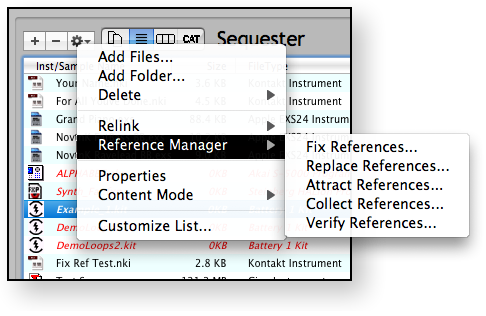
The great advantage to this is so a Instrument can be edited easily and saved quickly without any maintenance of the samples. (One of the big hassles of GigaStudio, before version 3, was that the samples had to exist in the same file as the mapping parameters. So, when you made a slight change to the structure of an Instrument, the ENTIRE FILE had to be rewritten. Sometimes those files were HUGE!)
The great disadvantage is that it's easy to lose track of where the samples are. If you use absolute paths, and you move the samples - the sample files have to be relinked. If you use relative paths, and you move either the samples or instruments in relation to each other, again you have to re-link. Add to that the hassle of having duplicate samples - whats samples to you re-link to?
Typically software samplers have not done a good job giving their customers utilities to re-link their samples if need be. This is where Reference Manager comes into use.
Reference Manager has several different types of re-linking techniques it employs:
| Fix References | Fixes any bad references. Scans an Bank/Instrument and verifies the links. On first detection of a bad link, this function asks you to either find the sample or to form a catalog of sub-folders from a folder of your choosing. It then uses that path or catalog to repair any further bad links. If it hits another bad link it can’t resolve, it asks you again, and you can add to the list of folders to check. |
| Replace References | Changes references based on your criteria. Brings up immediately a Search-Replace-type of dialog. You can textually change the reference file names (Name and/or Path, etc.). You also have the ability to Fix References during or after this process. For more infromation and instructions regarding the Replace References dialog, please see the Replace Reference area in the next section. |
| Attract References | Fixes bad references by moving the files where the links dictate instead of changing the references; that is, the opposite of Fix References. If any links point to a non-existent volume name or drive letter, those links will be passed over. |
| Collect References | Takes references (good or bad) and moves/copies them to a new user-defined location. If any references are bad, it can fix them during the process (see Fix References above). You can elect to move the control file as well. Collect References is helpful for “weeding” out unused samples or simply setting aside a control file/sample files for individual checking or use. |
| Verify References | Creates a text file of good and bad links. Scans an Bank/Instrument, and lists the links and whether they are good or bad. |
All Reference Manager options are in the Preferences dialog under the Reference Manager tab.
EXS24 files can have dsome issues; please see the EXS24 31 Character Renamer section in this document for more information.