|
EXS24 31-Character Renamer |
Translator™ has a clever little feature regarding EXS24 instruments. Only Logic9 supports sample file names larger than 31 characters in EXS24. Although Apple designed Logic9 EXS24 files to be loadable into EXS24's of earlier Logic versions, there is a possibility that if you use sample file names larger than 31 characters that you won't be able to load the samples. Below is a full explanation:
An EXS file has a sample chunk for every referenced sample, it's not a Zone, but a reference to a sample. For Logic 9 it holds 1) a Short File Name (31 or lower characters) that indicates the name of the sample file, 2) the path to its folder, and 3) a Long File Name, which is the sample file name in it's full length.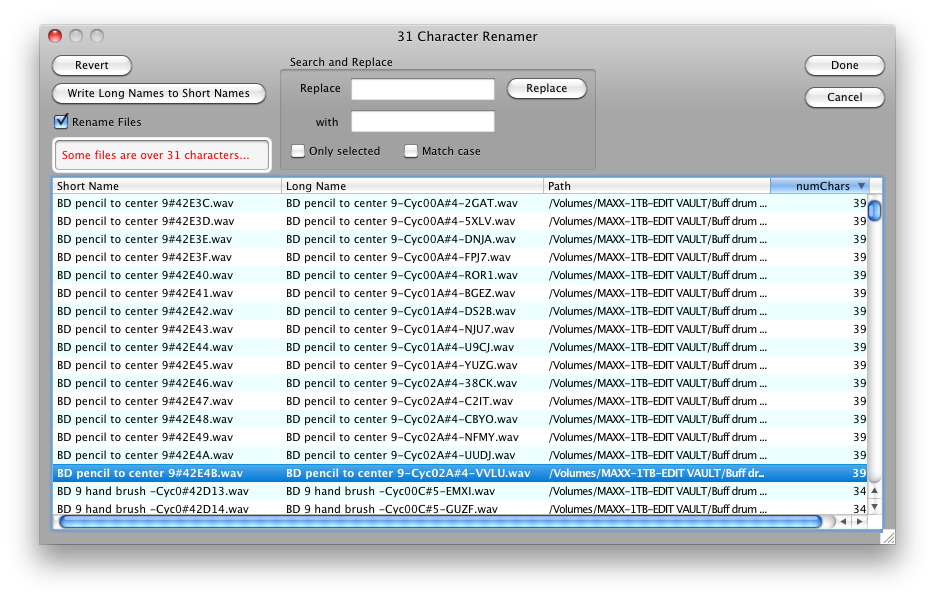
In OSX, all files have an internal short file name and a displayed long file name. They are the same if the name is 31 chars or less. If more than 31 chars, the long file name is the full name and the short file name is that weird naming thing you see. IMPORTANT: The short file name is NOT part of the file, it is part of the directory naming system on the disk. If you move this file or send it to someone, the short file name will change; the random part after the "#" changes.
In Logic 8 the sample chunk does not have the Long file name, the Short file name is the only name the sampler has to go on. This is how Logic 8 can read a Logic 9 EXS24 files, it just recognizes the short file name, finds it if it's still valid and loads it. But as you've seen, if it's not the original file and the Short file name has changed without you knowing it, you're toast.
(The only exception to this is that Logic8 EXS24 files have 64 bytes dedicated to the Short file name area, so you can put in a Long file name in there (of course using other software than Logic) and EXS24 will load it. It just won't save it as a Long file name, and EXS24 saves those files sometimes without you knowing it.)
So, in summary... on EXS24 files that reference >31 file names there is this problem. You can choose to make the library Logic9-only or you can (with as little pain as possible) take the files down to the 31char limit. That solution is to take those >31 files and rename them down to the 31char limit so the short name and long name match. That way they can load into Logic 8 and Logic 9 with no issues.
Translator™ has a 31 Character Renamer as part of the Reference Manager routines. Get your EXS24 in the Object List, right click and choose Reference Manager->Fix References.
Translator™ will look through the file first and see if there are any >31 names. If there are, it brings up a dialog with all the names. You can manually change the long names (or use the Search-Replace thing), and the dialog informs you continually of the >31 name status. The last column tells you the length of the long name.
Here is a typical workflow:
Please use this with care, as if there are other files that depend on these renamed samples they will lose their links.
Also note the Replace-With functions, where you can change the text on many entries without having to do it manually.