|
Menus - Operations |
These Functions are also accessible via the Fucntion Buttons on the Main Interface on the bottom of the Main Screen.
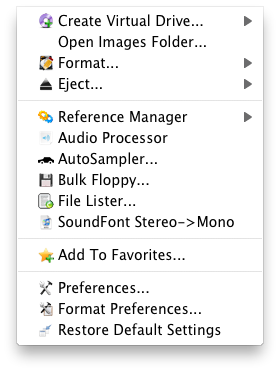 Create Virtual Drive
This allows you to create a new Virtual Drive form scratch, or a Virtual Drive from a current drive.
Open Images Folder
Opens the Images folder where Virtual Drive's or their aliases/shortcuts are stored.
Format
This shows you a list of drives that you can format into a proprietary format (Akai, Emu, etc.) Be careful with this function, but there are plenty of warnings along the way.
Eject
This shows you a list of drives where you can eject their contents or remove them from the system. Very handy for the Mac, and even Windows.
Reference Manager
Allows you to start a Reference Manager function on the selected files listed in the Object List. For more information, please see the Reference Manager section in this document.
Audio Processor
This opens the Audio Processor. For more information, please see the Audio Processor section in this document.
AutoSampler
This opens the AutoSampler. For more information, please see the AutoSampler section in this document.
Bulk Floppy (Windows only)
This opens the Bulk Floppy assistant, where you can read and write floppy images.
File Lister...
This opens the File Lister, where you can list the contents of any folder into a TEXT file.
Preferences
This opens the Preferences dialog. For more information, please see the Preferences section in this document.
Format Preferences
This opens the Format Preferences dialog. For more information, please see the Format Preferences section in this document.
Restore Default Settings
This erases your user preferences and restores the default set. (This is equivalent to "trashing your preferences" on the Mac.) This does not erase your registration information.