
|
Global Parameter Screen |
This is accessible through the Main Menu; either through the specific Command button or the Toolbar menu. This will reveal all the Global parameters. When opened, you will view the special Global file stored in the computer, rather than seeing what is actually in the sampler. You may READ the global parameters by clucking on the READ command button. This will read the sampler, and save the settings.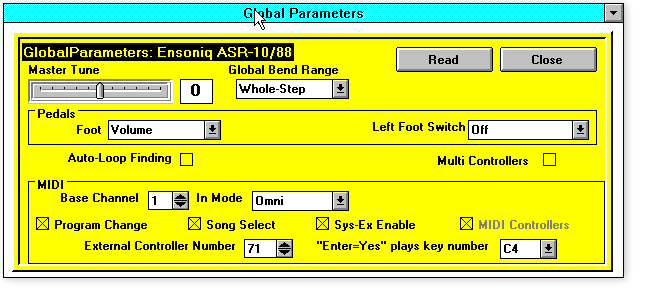
Master Tune
Use the handy slider to change the tuning.
Global Bend Range
Place the Text bar over the display box, type number, hit Enter
Touch/All Notes Off
Due to a weird Ensoniq idiosyncrasy, this is not available to be read or changed. Maybe next ASR version. (Why did we put this in here?)
Foot Pedal
Cluck on Command arrow and you will see your list of choices. (EPS only)
Sustain Pedal
Cluck on Command arrow and you will see your list of choices.
Aux Pedal (LftFtswtch on ASR)
Cluck on Command arrow and you will see your list of choices. Cluck on the appropriate one.
MIDI Base Channel
Place the Text bar over the display box, type number, hit Enter
Transmit
Cluck on Command arrow and you will see your list of choices. Cluck on the appropriate one. (ASR 3.2 bug prevents this from working. Maybe next version.)
BaseChannel Pressure Mode - FXSendBus3
(EPS/16-Plus only - on ASR-10 this works properly.) This is a strange one. Due to another strange Ensoniq idiosyncrasy, Ensoniq MIDI-Disk Tools for Windows will read the Basechannel Pressure Mode, but you cannot change it for the screen. However, it will not read FXSend Bus3 properly (it will always read “On”), but will find you change it from this screen. Cluck to toggle between “On” and “Off” for FXSend3. (Why is this? Ensoniq accidentally switched the access numbers between these two.)
MIDI IN Mode
Cluck on Command arrow and you will see your list of choices.
MIDI Sys-Ex
Check to turn on CAUTION: Once you change this, you will be cut-off from communication. Don’t tell us we didn’t tell you so...
MIDI Program Change, MIDI Song Select, MIDI Controllers, Auto-Loop Finding, Multi-Controllers
Check to turn on or off
MIDI External Control Number
Place the Text bar over the display box, type number, hit Enter
Enter Plays Note
Use the Command button to make your selection
Read / Close
READ instructs the Tools program to reread the Global parameters of the EPS/ASR. If you are using the program for the first time this is mandatory. Close exits the screen.