|
Digidesign Preferences |
Create Monolith
When converting into Structure, this creates a monolith file where the .patch file contains all the samples internally.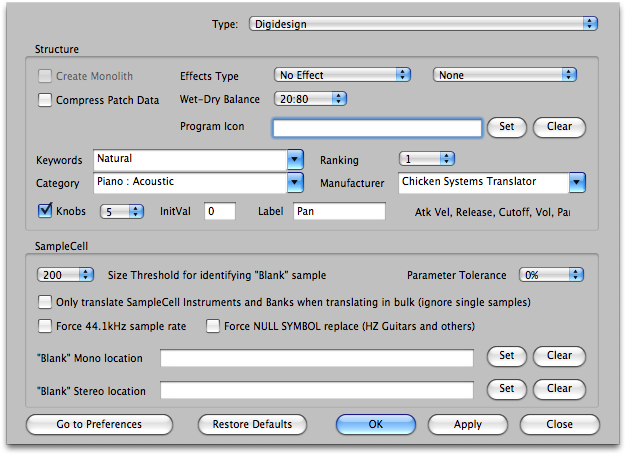
Compress Path Data
A Structure file is pretty messy inside; it contains a lot of information. It has methods to cut down on this information, but including these slows down the conversion time. This options allows turning this on or off. It does not in anyway affect the final sound product.
Effect Type
A Structure Patch can include one or more effects. Often an incoming sound does not include an effect, so this is handy to include a basic reverb, for example. Or perhaps you have something specific you want to put on all you new Structure files. You can also set the Wet:Dry balance of this effect.
Program Icon
In the Structure interface, a Program can have it's own icon, usually this is author/company that produced the file. This enables you to write on in of your own in newly-created Structure patches.
Keywords, Ranking, Category, Manufacturer
Structure has a fairly powerful database in which you can find your patches and sounds. These options enable you to write into your newly-created Structure patches database information so it can slide right into your current setup, so you don't have to manually do it later.
Knobs, Initial, Label
Structure has some "realtime knobs" that allow you to connect them to internal functions. These options enable the routing of these, what their initial values are, and how they are labeled.
Size Threshold for identifying "Blank" Sample
SampleCell Instruments have one "keymap" of samples it references. The twist is that every key must have a reference. In cases of keys or velocities that are not meant to reference any sample, programmers have used a "blank" sample that is either with no data in it or a very short one.
Since there is no real way of determining if a sample is "blank" or not, this determines what is the minimum length of sample that can be judged as "not blank" and allowed in as a reference and not ignored.
Default: 200
Only translate SampleCell Instruments and Banks when translating in bulk (ignore single samples)
Self-explanatory - converting a whole disk or folder of SampleCell Instruments, Translator will only convert the Instruments and Banks (and with it the Samples) and ignore converting the Samples in-and-of themselves as unique units.
Default: checked
Force 44.1kHz sample rate
SampleCell came in two flavors -the ones that used the SampleCell card, and SoftSampleCell -a program that could use any soundcard.
Apparently, the card only played back at 44.1kHz and thus there was tuning offsets applied that simulated 44.1kHz playback for non-44.1 samples. This option can be enabled if you encounter these types of sounds.
Default: unchecked
Force NULL SYMBOL replace
For some strange reason (and SampleCell, because of its age, can be really strange) certain SampleCell libraries reference samples that have a NULL SYMBOL at the end of their name. Hans Zimmer Guitars Vol. 1 is an example of this. Now, there is a difference between a NULL character (the number 0) and the NULL SYMBOL character (Unicode symbol 0x2400). SampleCell is hardwired to look for NULL and NULL SYMBOL when a 0 is in the sample name in the Instrument file. Checking this option forces this for all libraries, not just Hans Zimmer Vol. 1.
Default: unchecked
"Blank" Mono sample location
When converting into SampleCell, Translator may need to write a "blank" sample to cover a non-sounding key or velocity. This enables one consistent mono "blank sample" instead of having to write millions of them around your disk.
"Blank" Stereo sample location
See above. There two separate blank files - mono and stereo, because SampleCell Instruments can be either mono or stereo - not both.
Parameter Tolerance
SampleCell Instruments share their envelopes, LFO's, and modulators with one global set. There cannot be settings for every reference.
Thus, if incoming references require unique values, Translator is either going to write new Instruments that accommodate this (and put them together as a Bank when finished), or you can use the Parameter Tolerance value (in a percent) to "tolerate" certain values and trade off complexity for the convenience of having a single Instrument represent your incoming Program, rather than a multi-Instrument Bank.
Default: 0%
Go To Comparison Options button
Takes you to the master Comparison Options area (under Options). This is Parameter Tolerance from a different angle - on a parameter set basis, you can choose to ignore incoming values when it comes to comparisons. The Parameter Tolerance value is applied to those parameter sets that are not ignored.